
Problem: Knowledge lives in PDFs; documentation, research, specifications, guides. Reading is passive and sequential. What if you could transform that static text into engaging dialogue and listen while commuting, exercising, or working?
This post explores how to build a production-ready PDF-to-Podcast pipeline using LangChain, Ollama for local intelligent script generation, and Microsoft edge-tts for neural voice synthesis.
The Architecture: Three-Stage Pipeline
Our implementation follows a clean separation of concerns:
- Extract — Pull text from PDF documents with intelligent chunking
- Generate — Use Ollama to create natural dialogue between two hosts
- Synthesize — Convert dialogue to audio using edge-tts with voice customization
Stage 1: Intelligent Text Extraction
We chunk PDFs to 16K characters—large enough for context-rich dialogue, small enough that most models handle it without truncation:
def extract_text_from_pdf(uploaded_file) -> str:
    """Extract raw text from an uploaded PDF file."""
    pdf_reader = PdfReader(uploaded_file)
    text = ""
    for page_num, page in enumerate(pdf_reader.pages):
        page_text = page.extract_text()
        if page_text:
            text += page_text
            text += f"\n[Page {page_num + 1}]\n"
return textDecision point: 16K characters ≈ 4K tokens. This works for open-source models (mistral, llama2) and provides enough context for natural, back-and-forth dialogue.
Stage 2: Script Generation with LLM
Rather than generic narration, we ask the LLM to generate structured dialogue:
prompt = (
    "You are an expert podcast scriptwriter. Convert the following "
    "source text into a highly engaging, conversational 2-person "
    "podcast script between Host A and Host B only. Format output strictly:\n\n"
    "Host A: [text]\n"
    "Host B: [text]\n\n"
    "Make it natural, informative, entertaining. Alternate speakers regularly. "
    "Try not to use asterisks or special characters (will be read by text-to-speech). "
    "Do not include narration or stage directions.\n\n"
    f"Source Text:\n{chunked_text}"
)

config = {"callbacks": [langfuse_handler] if langfuse_handler else None}
response = llm.invoke(prompt, config=config)The prompt design is deliberately prescriptive: structured format for reliable parsing, conversational constraints to prevent TTS artifacts, and Langfuse integration for production observability.
Stage 3: Neural Voice Synthesis with edge-tts
The challenge: Streamlit is synchronous, but edge-tts is async. We bridge this with an event loop wrapper:
def synthesize_audio_wrapper(script_text: str, host_a_voice_id: str, host_b_voice_id: str) -> tuple:
    """Sync wrapper for async TTS function."""
    loop = asyncio.new_event_loop()
    asyncio.set_event_loop(loop)
    result = loop.run_until_complete(
        synthesize_audio_local(script_text, host_a_voice_id, host_b_voice_id)
    )
    loop.close()
return resultInside, we process line by line, resample to 24kHz, and concatenate audio segments. We chose edge-tts over alternatives because it offers 300+ neural voices, male/female options, regional accents (US, UK, Australian, Indian), runs on CPU, and requires no API keys.
Real-World Example: gen-ai-starter Repository
We ran the pipeline against the gen-ai-starter repository README PDF.
Input: 15-page PDF covering repository structure, examples, and architecture patterns (~15,000 characters)
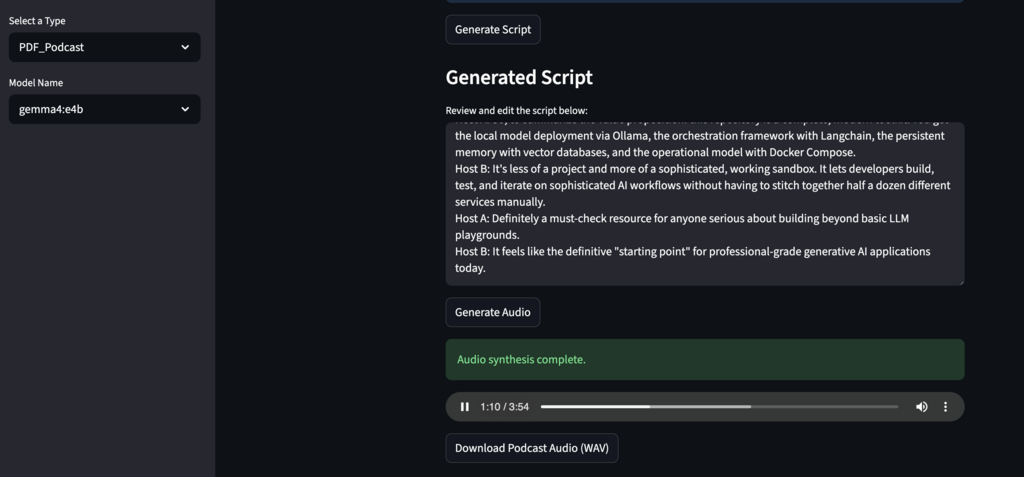
Output: ~4 minute podcast with two hosts discussing the framework
Workflow performance:
- PDF extraction: <1 second
- Script generation (gemma 4:e4b): ~10 seconds
- Voice synthesis: ~45 seconds
- Total: ~1 minute
The LLM successfully extracted core concepts (RAG patterns, agent architecture, testing strategy) and structured them as conversational dialogue. The dual-host format made technical content more approachable than reading would.
Get Started
The full implementation is available in the gen-ai-starter repository. To try it:
git clone https://github.com/jbsoftware-io/gen-ai-starter
cd gen-ai-starter

# install ollama
./etc/ollama_entrypoint.sh

# in a new terminal
docker compose up -d --build
open http://localhost:8501

# Select "PDF_Podcast" from the sidebar and upload any PDFBacked by comprehensive testing of PDF extraction, script generation, voice
synthesis, and error handling. Customize the 8-voice mapping to match your brand, integrate with batch processing, or extend to other content formats.
If you’re building content transformation workflows, contact us to discuss architecture and deployment.
Leave a Reply