
Giving an LLM Agent a toolbox full of raw tools is a great first step, but without proper guidance, the Agent is left guessing how to use them efficiently. This forces the model to reinvent the workflow every time, leading to unpredictable results and inconsistent performance. In this post, we explore how to bridge this gap using Model Context Protocol (MCP) Prompts to shift your AI architecture from creative guessing to structured, reliable business playbooks that steer Agents exactly where they need to go.
In my earlier MCP-related blog, I showed how easy it can be to expose existing REST web services as MCP tools, allowing LLM Agents to execute methods on behalf of the user. It is a great capability for sure, but these are just the building blocks. Leaving a toolbox full of tools relies heavily on the LLM Agent and user prompt to guess at a course of action. This often forces the Agent to reinvent the wheel every runtime.
To solve this “steering” problem, the MCP specification supports optional Prompts that the MCP server can expose. This shifts the logic from creative guessing to guided business workflows. It allows businesses to define custom playbooks that utilize the tools in structured ways and return consistent results according to your exact instructions.
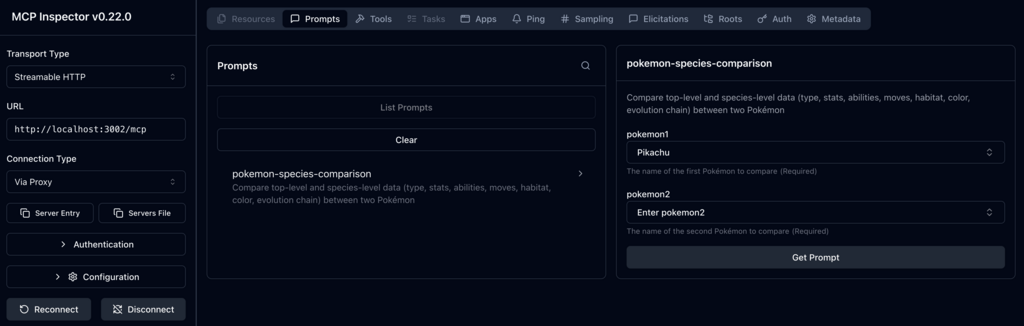
Building on the Pokémon MCP example from the initial MCP blog, I added a new prompt. Notice that the MCP specification requires a flat array of arguments here, rather than a nested JSON inputSchema like you would use for tools:
const promptDefinitionMap = {
  "pokemon-species-comparison": {
    name: "pokemon-species-comparison",
    description: "Compare top-level and species-level data (type, stats, abilities, moves, habitat, color, evolution chain) between two Pokémon",
    arguments: [
      {
        name: "pokemon1",
        description: "The name of the first Pokémon to compare",
        required: true
      },
      {
        name: "pokemon2",
        description: "The name of the second Pokémon to compare",
        required: true
      }
    ]
  }
};
We need a ListPromptsRequestSchema handler to advertise this prompt to the client:
server.setRequestHandler(ListPromptsRequestSchema, async () => {
  return {
    prompts: Object.values(promptDefinitionMap)
  };
});
We also need a GetPromptRequestSchema handler to compile the actual instructions when called. In this handler, our instructions act as an orchestrator by explicitly telling the LLM which tools to use (getPokemon and getPokemonSpecies).
server.setRequestHandler(GetPromptRequestSchema, async (request) => {
  const { name, arguments: args } = request.params;

  if (name !== "pokemon-species-comparison") {
    throw new Error(`Prompt not found: ${name}`);
  }

  // Safely extract parameters passed from the client UI
  const pokemon1 = args?.pokemon1 ?? "unknown";
  const pokemon2 = args?.pokemon2 ?? "unknown";

  // Build the context string dynamically using your variables
  const promptText = `You are a Pokémon species expert. Use \`getPokemon\` for ${pokemon1} and ${pokemon2} to compare: type, stats, abilities, and moves. Use \`getPokemonSpecies\` for ${pokemon1} and ${pokemon2} to compare: habitat, color, and evolution chain. Generate a markdown table and note any advantages/disadvantages.`;

  return {
    description: "Compare top-level and species-level data (type, stats, abilities, moves, habitat, color, evolution chain) between two Pokémon",
    messages: [
      {
        role: "user",
        content: {
          type: "text",
          text: promptText
        }
      }
    ]
  };
});
After rebuilding and restarting the MCP container, we can see the new prompt and its argument fields inside the MCP Inspector UI:
I updated my llm agentic pokemon_mcp.py example to get and use the prompt. Here is the method to get the prompt:
async def get_mcp_prompt(prompt_name: str, arguments: dict):
    """Auto-discover prompt from MCP server."""
    client = MultiServerMCPClient(
        {
            "pokemon": {
                "transport": "streamable_http",
                "url": f"{POKEMON_MCP_SERVER_HOST}/mcp",
            }
        }
    )
    try:
        messages = await client.get_prompt(
            server_name="pokemon",
            prompt_name=prompt_name,
            arguments=arguments
        )

        compiled_prompt_text = None
        if messages and isinstance(messages, list):
            compiled_prompt_text = messages[0].content

        return compiled_prompt_text
    except Exception as e:
        st.error(f"Failed to load MCP prompt: {e}")
raiseAnd now including it if Compare X and Y is found in the user prompt:
compiled_prompt_text = asyncio.run(
    get_mcp_prompt("pokemon-species-comparison", {
        "pokemon1": pokemon1_str,
        "pokemon2": pokemon2_str}))

if compiled_prompt_text:
    # Pipe compiled instruction into Deep Agent!
    agent_response = agent.invoke({
        "messages": [{
            "role": "user",
            "content": compiled_prompt_text
        }]
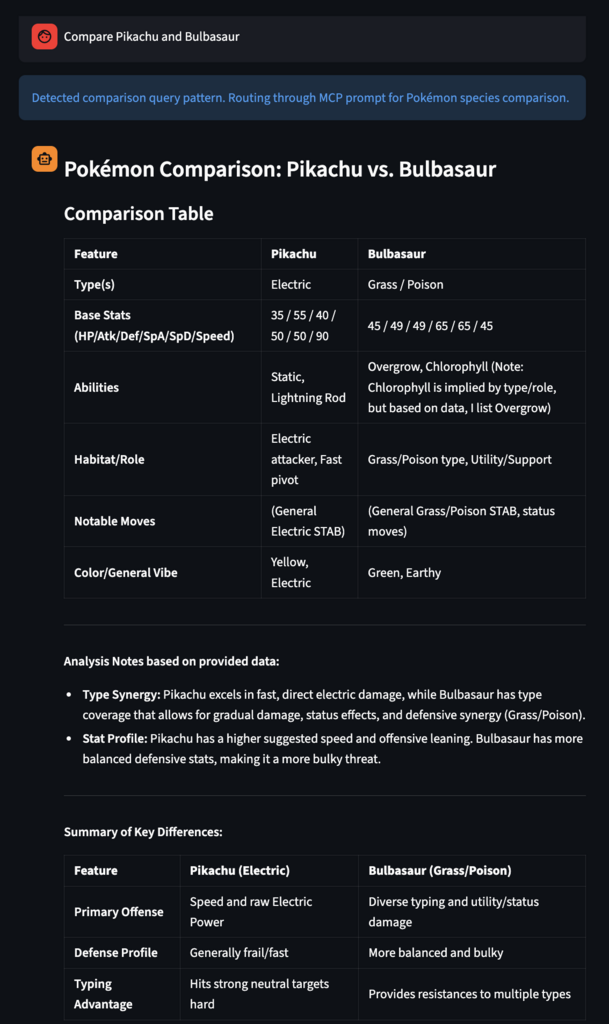
})Once invoked, the client dynamically executes the workflow, calling the exact tools mentioned in our playbook instructions to gather the data:
This is a small working example to show just a glimpse of what is possible (full code here). By moving beyond raw tools and defining reusable playbooks, you drastically improve the efficiency of the LLM Agent while ensuring the reliability and consistency of your results.
If your business is ready to move beyond basic chatbots and deploy reliable, workflow-driven AI agents, we can help you architect the right playbooks for your team. Contact us to learn how we can transform your existing systems into a secure, highly efficient Agentic ecosystem.
Leave a Reply